
Blog Options
RT-Theme 19 Customizer Blog options.
The product settings menu looks like this:
-
Use the left arrow to get back to the upper parent settings menu item.
-
Use the Save and Publish button to save your changes made in the settings.

In the Blog settings the following settings can be adjusted:
- Global Layout settings. Select and set a default column layout for the blog category & archive listing pages. Grid or Masonry layout.
- Featured images. Show on/off cropping, size
- Excerpts. Enbale the use of excerpts or when disable the use of moretags.
- Post meta. Enable or Disable meta settings for single blog post or blog listing pages.
- Blog Name. Default Title for single blog pages in the header area.
Global Blog Layout Options
The following settings can be adjusted:
- Select and set a default column layout for the blog category & archive listing pages for each of the post items listed within those pages.
- Select and set a default layout style for the blog category & archive listing pages. Grid or Masonry

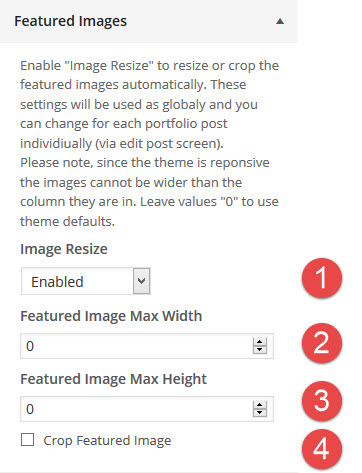
Blog Featured Image Settings
In the Blog Featured image the following settings can be adjusted:
- Enable or Disable the featured image to show on listing pages.
- Set the maximum width in pixels.
- Set the maximum height in pixels.
- Enable or Disable cropping of the featured image.
Note : These settings can be adjusted in the single blog post item itself.
Blog Excerpts
In the Blog Excerpt Settings you can enable the use of excerpts or use or more-tags:
- Excerpts: On /Off.
Note : If excerpts are disabled then your will see the complete content of a post in blog listing pages unless you have inserted more tags into the content of the blog post.
Note : You can use a function to change the excerpts length. Consult the wordpress.org codex for this.

Note : If you do not see the excerpt field in the single post then enable it in the screen options below the admin name.

Note : Each screen in the admin area has different screen options.
Blog Post Meta Options
In the Blog Meta Settings you can enable disable what meta information should show on :
- the blog listing pages. Author name, Categories, Number of Comments, Post Date
- the blog single blog pages. Author name, Categories, Post Date

Blog Post Single Post Title
In the Blog Single Post Page Settings you can set a default post title for all single blog pages. If no title is set it will display the post title instead.

